Prepare Wordpress for a new home

Your Wordpress installation contains some site specific values which will probably be different at your new site

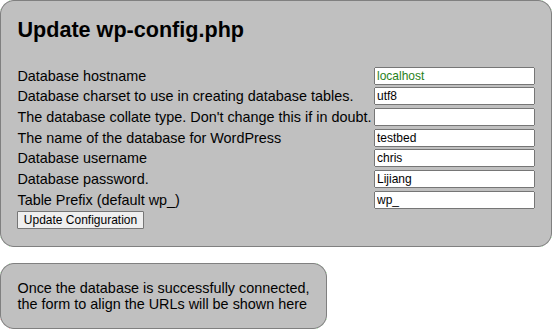
The Wordpress configuration file contains most of the values that need changing. Below is a bit more information about what each of the values is for.

Database hostname
This is the url of the service that is responding to database requests. If you are using a hosting provider, they should be able to give you this information
Database charset
You should not change this because the new site needs to know how your database is organised regarding character encoding, and you are unlikely to be changing this
Database collate type
Again you should not need to change this. The collation type determines for example how to deal with upper and lower case and characters outside the a-z range when sorting.
The name of the database for Wordpress
If you are using a hosting provider, when you create a new database (they may have done it for you), they will likely specify the database name so as to avoid clashes with other clients. In this field put the name of the database that you or they have created
Database Username
When Wordpress accesses the database it has to identify itself with a user name and password. If you are hosted, the provider will tell you this
Database Password
Wordpress uses this password to authenticate itself when logging in to the database.
Table Prefix
This defaults to wp_ but if you are holding more than one Wordpress site in the same database, you need to use an alternative prefix. You may be able to retain the old prefix. If you need to change it, you will need to also rename every table in the database to have the new prefix. This routine will not do that for you.